
Make a plan together.
Ask Codex to put something on your agenda.
You, in Codex
“Give me half an hour for a walk at noon.”
Your day, shared with your assistant
Make a plan together. Change it with your own hands. Pick up from the same place next time.

Your plans. Your changes. One shared record.
A conversation that carries over
You shouldn’t have to explain your whole day again because you moved something on your phone.
Ask Codex to put something on your agenda.
“Give me half an hour for a walk at noon.”
Open Ruthie. Move the walk to 12:30. Change your mind as often as your day needs.
Your assistant reads the updated plan before helping with what’s next.
“Your walk is at 12:30.”
An example of the shared workflow, using the Ruthie plugin for Codex.
And a lovely place to land
You don’t need to ask an assistant to see what’s ahead. Open Ruthie, add a thought, rearrange a plan, or just get on with it.
A quick look around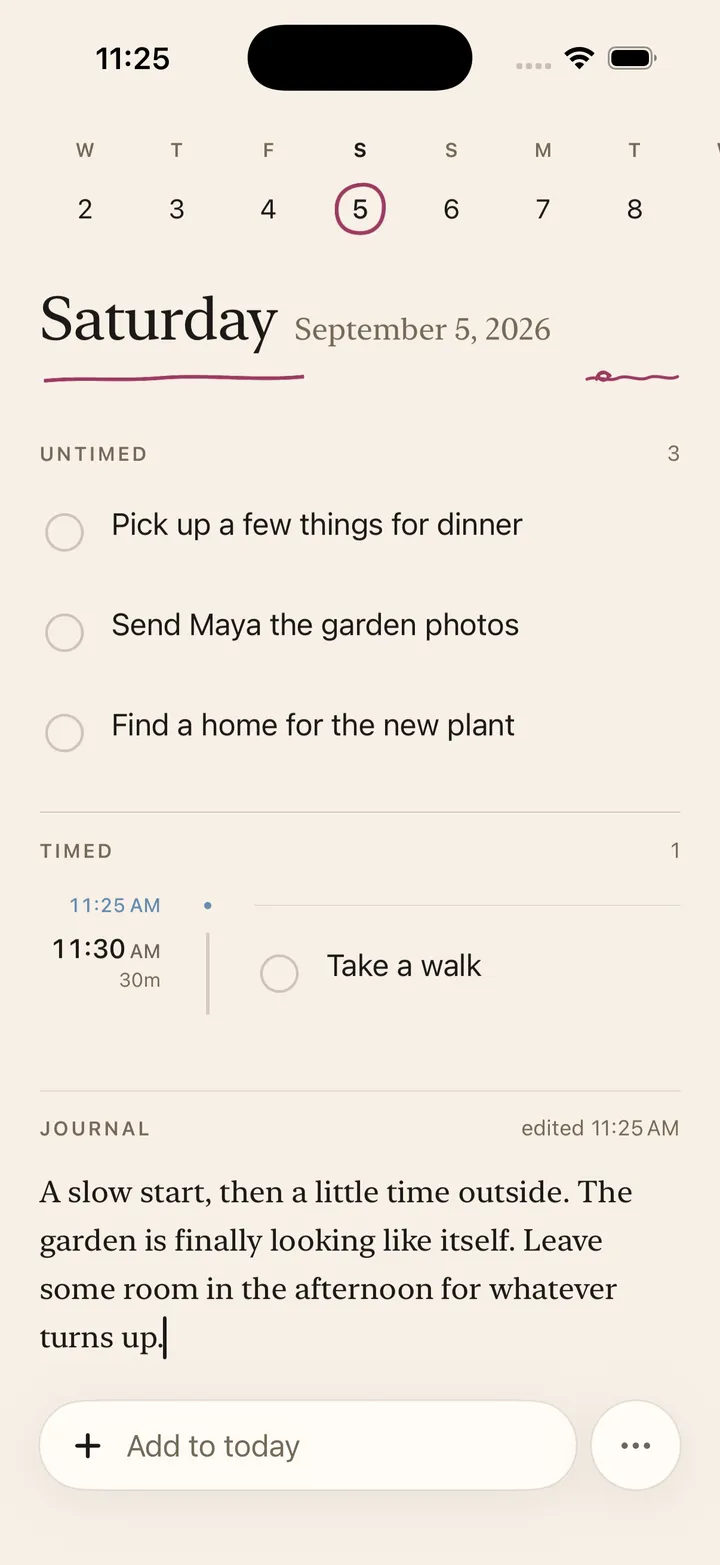
Keep untimed plans, things with a time, and your Journal together on one page for the day.
 02 / TOP OF MIND
Keep up to three things Top of Mind. Let one go when you’re ready. It stays right where it belongs in your agenda.
Review unfinished plans and choose what comes into today. A new day doesn’t need a second copy of yesterday.

Some things come with you.
You choose which ones.
Connect your assistant. Starting with Codex.
Let Codex help arrange your plans, review unfinished work, and keep your chosen priorities in view.
Both of you work with the same agenda. Your edits become the current plan, ready for the next conversation.
And when you want to plan on your own, Ruthie is there for that too. There’s no built-in chat to get through first.
More about the connectionA few things you might be wondering
No. Ruthie works as a daily agenda and Journal on its own. The Codex plugin gives your assistant a way to help with the same plans.
Edit it directly in Ruthie. Your assistant sees the correction the next time it reads the agenda. It doesn’t need a separate explanation of every change.
We’re starting with iPhone and the Ruthie plugin for Codex. Join the beta list to hear about testing opportunities. Setup details come with your invitation.
Joining the beta list is free and doesn’t commit you to a purchase. Any purchase offer will explain the price and terms before you decide.

Taking shape, one day at a time
We’d love a few fresh eyes on Ruthie for iPhone.
Want to try an early version and tell us how it feels?
Help test Ruthie